
VMware Server Console SSH Access - Guide
Remote Access to Ubuntu VMs: A Solution for Forgotten SSH
Have you ever encountered a situation where you created a new virtual machine with Ubuntu on a VMware server, only to realize you hadn't installed the ssh server? This can leave you unable to access the machine remotely. Instead of physically returning to the server location, a viable solution can be implemented.
Research revealed that the VMware console communicates via port 902. Therefore, establishing a port-forwarding rule through an ssh tunnel provides a pathway for remote access and subsequent installation of openssh.
Port Forwarding Using the Command Line
Accessing local ports below 1024 necessitates root privileges or the use of sudo. The following command establishes a connection, forwarding traffic from your client machine's local port 902 to the server specified by hostname.com.
sudo ssh -L 902:localhost:902 [email protected]
Once this tunnel is established, you can proceed to connect to the console as detailed in the final section.
Port Forwarding with SecureCRT
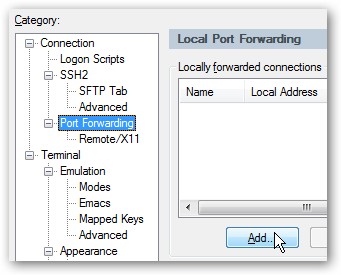
For users of SecureCRT on Windows, configuring port forwarding is straightforward. Open your session options and navigate to the Port Forwarding settings. Click the "Add" button to create a new forwarded connection.
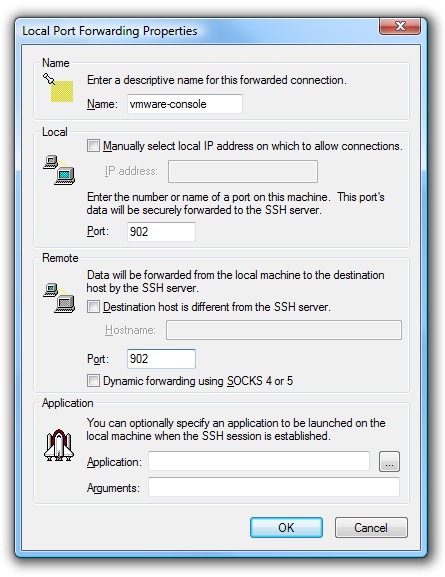
Input a descriptive name and utilize 902 for both the "Local Port" and "Remote Port" fields, as illustrated below:
Connecting to the Console
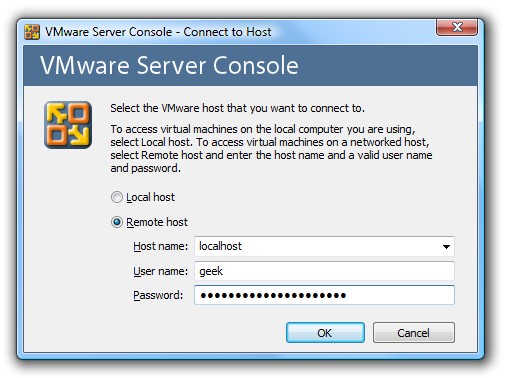
Launch your locally installed VMware Server Console. When prompted for the Remote host name, enter "localhost". Avoid selecting the "Local host" radio button, as this attempts a direct connection. We require a connection routed through the established ssh tunnel.
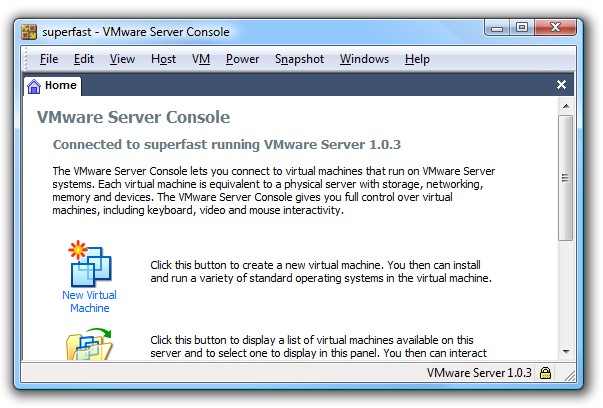
Successful configuration will grant you access to the console.
Important Considerations
- While the server console generally performs adequately, accessing the console of individual virtual machines requires a robust network connection. Otherwise, performance may be significantly degraded.
- This method is best suited for tasks such as powering machines on or off, or modifying configuration settings.
- Your local firewall may need adjustment to permit traffic on the designated port.
- Users of Putty can readily adapt these settings to achieve similar functionality.