
Gemini Email Summaries: Automatic Updates & Opt-Out

Gemini Now Automatically Summarizes Emails in Gmail
Google’s Gemini AI assistant is becoming more integrated into the Gmail experience with the introduction of email summary cards. These cards will appear directly at the top of your emails, providing concise overviews.
Automated Summarization
The company announced on Thursday a shift in functionality. Users will no longer be required to actively request an AI-powered email summary. Instead, Gemini will proactively summarize email content as needed, operating without explicit user initiation.
Previously, when Gemini was launched within Gmail’s side panel last year, users could summarize lengthy email threads. Other tools were also available, such as email drafting assistance and suggested replies.
AI Integration and Potential Concerns
This update signifies a broader trend of AI being incorporated into frequently used software and services. However, it’s important to note that AI-generated summaries are not always perfect.
Similar issues arose when Apple introduced AI summaries for app push notifications. The BBC reported inaccuracies in news headline summarizations, leading Apple to temporarily suspend the feature for news applications.
Google’s own AI Overviews in Search have also faced criticism for occasionally providing inaccurate or low-quality information.
How the New Feature Works
The new email summary cards will identify the key points within a longer email. Furthermore, the synopsis will be dynamically updated as new replies are received.
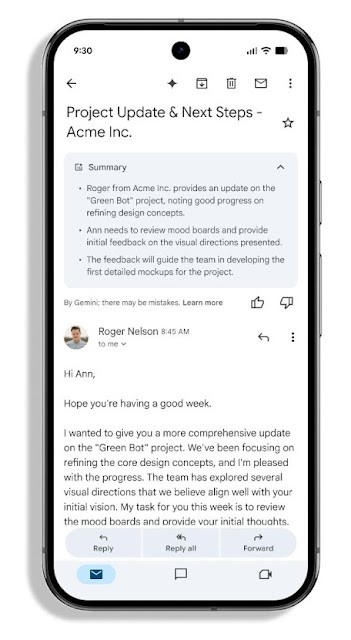 Users still have the option to manually generate a summary by clicking a dedicated button. This option remains available as a chip at the top of the email and within Gmail’s Gemini side panel.
Availability and Control
Initially, the feature is limited to emails written in English.
The activation status of summary cards may vary depending on your geographical location. Smart features are currently disabled in the EU, the U.K., Switzerland, and Japan, as detailed in Google’s help documentation.
User and Admin Options
Users can individually enable or disable the feature through Gmail’s Settings, specifically under the “Smart features” section. Administrators of workplaces can also disable personalization settings for their users via the Admin console.
This provides organizations with control over the implementation of Gemini’s automated summarization capabilities.