Gemini in Google Sheets: Faster Data Analysis & Visuals
Gemini Enhancements for Google Sheets
Google is rolling out a significant upgrade to its Sheets application, integrating the power of Gemini to accelerate data analysis and visualization.
This integration empowers users to leverage AI for transforming spreadsheet data into insightful charts and graphs.
Data Analysis and Insight Generation
The update provides access to Gemini's analytical abilities, enabling the identification of key data points. These include correlations, emerging trends, and unusual outliers within spreadsheets.
Users can now readily generate sophisticated visualizations, such as heatmaps, and seamlessly incorporate them as static images directly into their spreadsheets.
Availability
Although initially announced last month, Google confirmed on Friday that this functionality is now accessible to all Workspace business users.
How to Access Gemini in Sheets
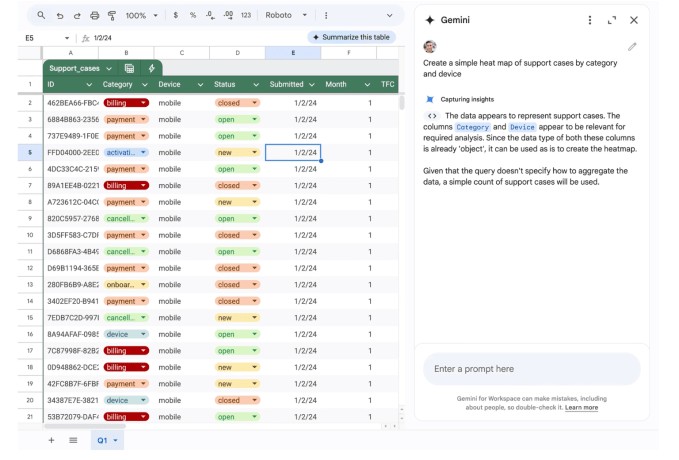
Initiating the AI-powered analysis is straightforward. Simply click the Gemini icon located in the upper right corner of your spreadsheet.
From there, you can pose specific questions, like predicting future net income based on historical data or creating a heatmap visualizing support cases categorized by device and type.
 Real-World Applications
Consider a marketing manager requesting insights into the performance of their top three conversion channels. Or, a financial analyst seeking to pinpoint anomalies in inventory levels for a specific product.
These are just a few examples of the types of queries Gemini can address.
Underlying Technology
Gemini achieves these capabilities by dynamically generating and executing Python code. The results are then analyzed to deliver comprehensive, multi-layered insights.
For less complex requests, Gemini may utilize standard spreadsheet formulas to provide answers directly.
Data Preparation for Optimal Results
To ensure accuracy, Google recommends that data be consistently formatted, with clearly defined headers and a complete absence of missing values.
Related Posts

ChatGPT Launches App Store for Developers

Pickle Robot Appoints Tesla Veteran as First CFO

Peripheral Labs: Self-Driving Car Sensors Enhance Sports Fan Experience

Luma AI: Generate Videos from Start and End Frames

Alexa+ Adds AI to Ring Doorbells - Amazon's New Feature