
Comment Out and Uncomment Lines in Configuration Files
Understanding Code and Configuration Comments
Instructions sometimes direct users to “uncomment” or “comment out” specific lines within configuration or source code files. While seemingly straightforward, this process can be unclear for those unfamiliar with file structures.
Lines designated as comments are intentionally ignored by the interpreter or compiler. Their primary function is to provide clarity and explanation for human readers.
The Purpose of Comments
Comments serve as annotations within the code or configuration. They do not affect the program's execution or the system's behavior.
Due to their non-executable nature, comments are frequently utilized to temporarily disable or re-enable configuration settings in configuration files.
How Comments Function
By strategically commenting out lines, administrators or developers can easily toggle features on or off without deleting the original code.
This approach offers a convenient method for testing different configurations or troubleshooting issues. It allows for quick reversion to previous settings.
Benefits of Using Comments
- Improved code readability and maintainability.
- Easy disabling and enabling of features.
- Facilitates collaboration among developers.
- Provides a record of changes and reasoning.
Essentially, comments are a vital tool for managing and understanding complex codebases and configuration files. They enhance both the development process and long-term maintainability.
Understanding Commenting and Uncommenting
The process of “uncommenting” a line within a configuration file involves the removal of the '#' symbol positioned at the beginning of that line. Conversely, to “comment out” a line, a '#' character is added to its beginning. It’s important to note that comment syntax can vary depending on the programming language or file type.
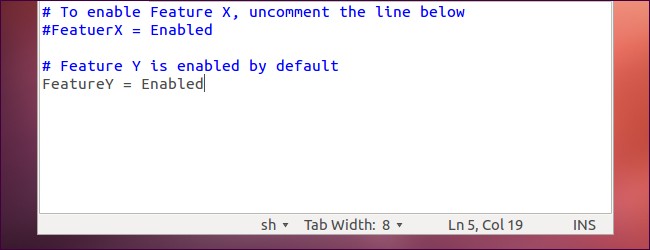
Consider the following example, illustrating a configuration file’s initial state:
# To enable feature X, uncomment the line below
#FeatureX = Enabled
To activate the feature, the '#' preceding 'FeatureX = Enabled' must be deleted, resulting in:
# To enable feature X, uncomment the line below
FeatureX = Enabled
The reverse operation – commenting out a line – is equally straightforward. Starting with this:
# Comment out the line below to disable feature Y
FeatureY = Enabled
Adding a '#' before 'FeatureY = Enabled' will disable the feature:
# Comment out the line below to disable feature Y
#FeatureY = Enabled
After implementing these modifications, it is crucial to save the altered configuration file to ensure the changes take effect.
Understanding Comments in Configuration Files
The terms “commenting” and “uncommenting” lines in configuration files are frequently used, but their meaning is rooted in the file's structure. It’s crucial to grasp how these files are organized to fully understand these concepts.
Configuration files contain not only directives that control a program’s behavior, but also comments. These comments are designed for human readers, serving as explanations of the file’s format and purpose.
The Role of the '#' Symbol
The '#' symbol denotes a comment line. When a line begins with '#', the computer interprets it as explanatory text and proceeds to disregard it during processing.
Essentially, the system will skip over any line starting with '#' and move on to interpret the subsequent line that doesn’t have this prefix.
Enabling and Disabling Configuration Options
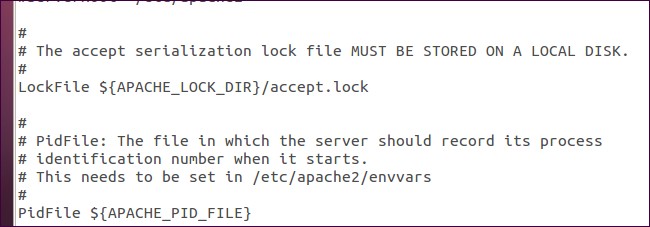
Often, configuration files include options that are initially disabled. This is achieved by placing a '#' at the beginning of the corresponding line.
To activate a disabled configuration instruction, simply remove the '#' character. Conversely, to deactivate an instruction or to add your own notes, prepend a '#' to the beginning of the line.
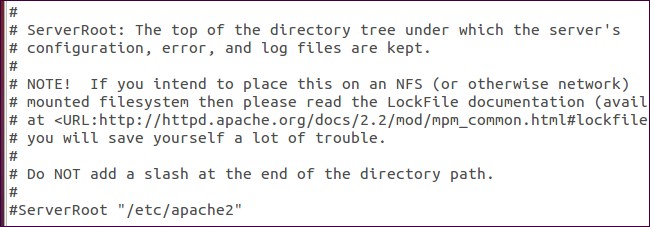
This simple mechanism allows for easy modification and documentation within configuration files, enhancing their usability and maintainability.
Alternative Commenting Conventions
The comment format detailed previously is frequently encountered within configuration files and shell scripts, particularly on Linux and similar UNIX-based systems. However, diverse programming languages often employ distinct commenting styles.
Consider, for instance, a PHP script; you may encounter a code block resembling the following:
/* This code segment is initially disabled to prevent potential issues.
To activate feature X, remove the comment delimiters.
PHP code instruction.
Another PHP code instruction. */
Activating the feature involves removing the comment markers, resulting in:
/* This code segment is initially disabled to prevent potential issues.
To activate feature X, remove the comment delimiters. */
PHP code instruction.
Another PHP code instruction.
This represents a multi-line comment in PHP, also known as a C-style comment, delineated by /* at the beginning and */ at the end.