Skype Shutdown: Top Alternatives for Video & Voice Calls

Skype's Impending Discontinuation After Two Decades
For over two decades, Skype has facilitated global communication. However, the widely-used video-calling platform is now being retired.
Microsoft, Skype’s parent organization, has officially announced the service’s end-of-life date as Monday, May 5, 2025.
Transition Options for Skype Users
Individuals currently utilizing Skype have two primary options. They can transfer their contacts and conversation history to Microsoft Teams.
Alternatively, users can opt to download their Skype data for use with a different video-calling application.
Resources for a Smooth Transition
To support users during this change, comprehensive guidance has been developed.
This guidance details the processes for migrating to Teams or downloading Skype data.
Exploring Alternative Video-Calling Solutions
A curated selection of alternative video-calling applications has been assembled.
These apps offer viable replacements for Skype, ensuring continued connectivity.
- Consider Microsoft Teams for seamless integration within the Microsoft ecosystem.
- Explore other platforms to find the best fit for your communication needs.
Transitioning from Skype to Microsoft Teams
Individuals currently utilizing Skype have the ability to log into Microsoft Teams at no cost, leveraging their existing Skype login information. Upon successful login, all previous conversations and contact lists will be seamlessly migrated to the new application.
The functionality within Teams mirrors many aspects of Skype, encompassing both individual and group video conferencing, instant messaging capabilities, and the sharing of files. However, while Skype was initially geared towards smaller interactions and personal communication – typically supporting up to 20 attendees – Teams is engineered for professional environments.
Teams significantly expands capacity, enabling video calls with as many as 10,000 participants. Furthermore, it incorporates enhanced security protocols and a wide array of integrations.
Key Integrations Available in Teams
- Evernote
- OneDrive
- Office 365
- Salesforce
- SharePoint
- Trello
These integrations streamline workflows and enhance productivity within a collaborative setting. Teams is readily accessible across a multitude of platforms, including Android, iOS, macOS, Windows PC, and through web browsers.
Exporting Data from Skype
Even for those choosing not to migrate to Microsoft Teams, exporting your Skype data is a prudent measure. This practice guarantees a secure backup of crucial information, including messages, shared files, and contact information, for future access.
Initiating the Export Process
Begin by launching Skype and logging into your account. Then, navigate to the settings menu.
- Access the settings by clicking the three horizontal dots located beneath your account name in the upper left corner.
- Select Settings, then navigate to Account & Profile, and finally choose Your Account.
Data Export Options
You will be redirected to Skype’s web portal, where several export options are available. These allow you to preserve different aspects of your Skype activity.
- Choose to Export contacts (.csv) to save your contact list.
- Alternatively, Export Caller ID numbers (.csv) can be selected to retain this specific data.
- For a comprehensive backup, utilize the Export files and chat history option.
Downloading Your Data
The “Export files and chat history” feature provides the ability to download both Conversations and Files. This ensures a complete archive of your Skype interactions.
After selecting your desired export options, click Submit Request and then Continue to initiate the process. Once the export is finalized, a Download link will become available for you to retrieve your data.
Exploring Alternatives to Skype
Google Meet
 A significant advantage of Google Meet is its accessibility through a free Google account. Given the widespread use of Google services and existing user accounts, adoption of this platform is generally straightforward.
Google Meet facilitates meetings with up to 100 attendees, offers recording capabilities, and supports screen sharing, among other features. However, the complimentary plan imposes a 60-minute duration limit for meetings exceeding three participants.
For larger organizations, Google Workspace subscriptions – starting at $7/month, $14/month, $22/month, and beyond – unlock advanced functionalities. These include up to 25 co-hosts, breakout rooms for focused discussions, interactive polls, dedicated Q&A sessions, and YouTube livestreaming. Furthermore, Workspace integrates AI-driven tools via the Gemini assistant, aiding in note-taking and custom background creation.
Zoom
Zoom stands as another widely utilized web-conferencing solution. It provides a range of useful tools, including support for up to 100 participants, both private and public chat groups, note-taking features, a digital whiteboard, and screen-sharing options. Meeting recordings and transcripts are also available.
A limitation of the free plan is the 40-minute meeting time restriction. To circumvent this, a paid subscription is required, with options ranging from $13/month to $18/month. Subscribers gain access to Zoom’s AI Companion, enabling meeting summarization and question answering based on transcribed content.
Webex
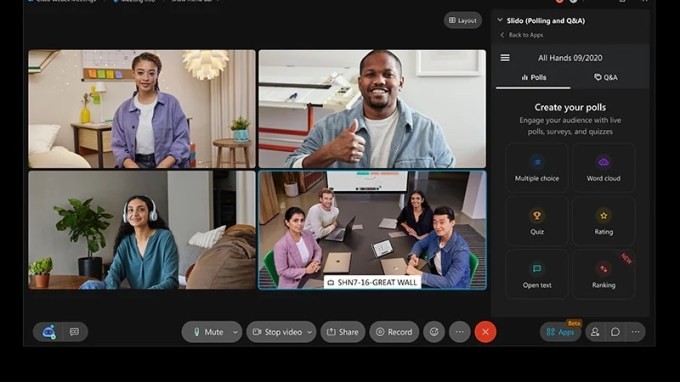 Webex, a video conferencing tool owned by Cisco, presents a comparable offering to its competitors. It includes features like screen sharing, session recording, and a collaborative whiteboard.
The free plan accommodates up to 100 attendees per meeting, but is subject to a 40-minute time limit. Webex also provides paid plans starting at $12/month, $22/month, and higher, depending on team size. These tiers incorporate an AI assistant, live polling, Q&A functionality, and the capacity to host up to 1,000 participants.
Discord
Originally conceived as a communication platform for gamers, Discord can also function as a Skype alternative for personal use or smaller teams. However, it is not ideally suited for larger business environments, as it limits calls to a maximum of 25 participants.
Discord offers unlimited meeting durations and features such as screen sharing, meeting recording, and breakout rooms. A free plan is available, alongside two paid options priced at $5/month and $10/month, positioning it as a relatively affordable solution based on user requirements.
Slack
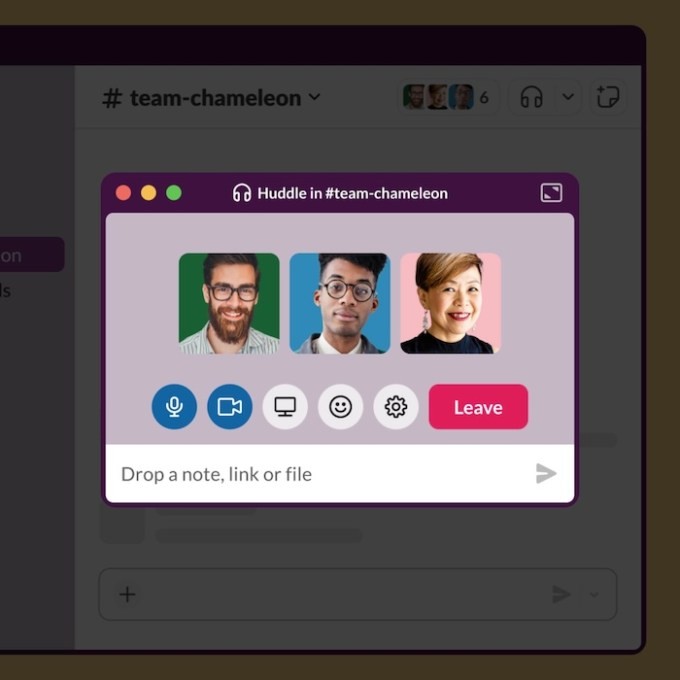 While not specifically designed for formal, large-group meetings, Slack can be effective for impromptu discussions within team channels. The Huddle feature allows users to seamlessly transition from a chat thread to an audio or video call with colleagues.
On the free plan, Huddles support only two participants, while paid plans (priced at $7/month or $12/month) extend this capacity to up to 50.
Signal
Since 2020, Signal, the encrypted messaging application, has included group video-calling functionality, supporting up to 50 participants in a single call.
Though not a direct competitor to Skype, Signal enables users to share call links, simplifying the process of inviting others, similar to Google Meet, Zoom, and Microsoft Teams. Importantly, Signal is available for free.
For mobile users seeking video calling with smaller groups, other comparable applications include WhatsApp, Facebook Messenger, and Apple FaceTime.
Related Posts

Apple Now a Debt Collector? New Developer Agreement Details

Instacart to Pay $60M to Settle FTC Deceptive Practices Claims

Apple App Store Japan: Now Open to Competition

Alexa+ Adds AI to Ring Doorbells - Amazon's New Feature

YouTube Disputes Billboard Music Charts Data Usage