
Travel With GlobeConvert - Currency & Unit Converter iOS

Understanding Volume and Currency Conversions
When traveling between the United States and countries like the United Kingdom, differences in measurement systems can present challenges. The American system utilizes the ‘gallon’, while the British, along with many Commonwealth countries, employ the ‘liter’.
Despite sharing a language, these differing standards can be confusing, particularly for those not accustomed to transatlantic travel. Accurate conversion between these systems requires both practice and a grasp of the relevant mathematical formulas.
However, unlike Phileas Fogg during his journey around the world, modern travelers have readily available tools to simplify these conversions.
Introducing GlobeConvert
Today’s smartphones offer convenient access to GlobeConvert, a unit and currency conversion application. This tool is ideally suited for use with iPhones, iPod touches, and iPads.
The application requires iOS 4 or a later version to function correctly. It provides effortless conversion between frequently used units of measurement, adapting to the user’s preferred system.
For international travelers, a key feature of GlobeConvert is its ability to perform real-time currency conversions.
Additional Information
- GlobeConvert is available as a free application.
- The free version includes advertisements.
- A Pro version, removing advertisements, can be purchased for $0.99.
With GlobeConvert, navigating different measurement and monetary systems becomes significantly easier, ensuring a smoother travel experience.
The Critical Need for Precise Currency Conversion
Beyond standard unit conversions, accurate and real-time currency conversion is paramount. Foreign exchange rates are in a constant state of flux, increasing and decreasing in value.
This dynamic is particularly significant in today’s interconnected global economy. Even seemingly minor discrepancies, measured in cents or smaller denominations, can lead to substantial errors in local currency payment calculations.
Such inaccuracies can potentially result in financial loss. Despite the prevalence of credit and debit card transactions, physical currency still changes hands frequently.
Why Staying Current Matters
Access to up-to-date exchange rate information is crucial for a variety of scenarios. These range from everyday purchases like souvenirs to complex international business negotiations.
Consider these examples:
- Travelers: Ensuring you receive the correct amount of local currency when exchanging funds.
- Businesses: Accurately pricing goods and services for international customers.
- Online Shoppers: Understanding the final cost of purchases made from foreign retailers.
Maintaining awareness of current exchange rates protects against overpayment and ensures fair transactions. It’s a fundamental aspect of responsible financial practice in a globalized world.
Therefore, prioritizing accurate currency conversion is not merely a matter of convenience, but a necessity for sound financial management.
The Convenience of GlobeConvert
GlobeConvert provides coverage for over 190 currencies globally. This extensive range ensures support even for less common currencies, making it ideal for travel to more remote destinations. Beyond currencies, the application offers 10 distinct converter types and a selection of more than 80 units.
Therefore, instead of performing complex calculations manually, users can simply input their values into the app for quick conversions.
Initial Interface
Upon launching, GlobeConvert defaults to the currency conversion screen.
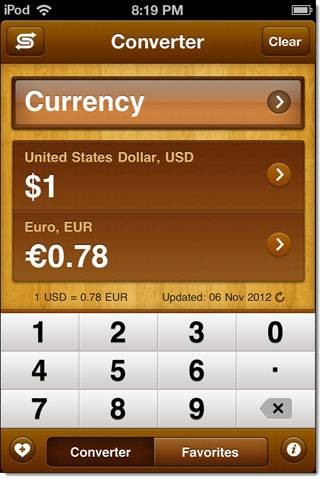
Users can select their desired currencies by tapping the arrow icon and navigating the comprehensive alphabetical list. In this example, a conversion from US Dollars (USD) to Euros is being demonstrated.
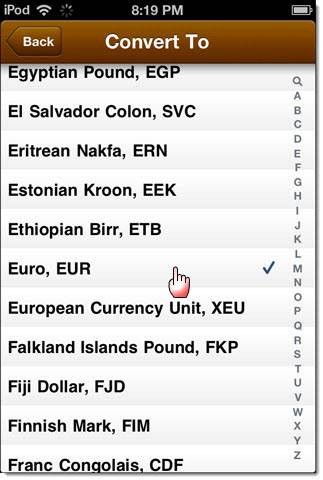
Functionality and Information
Returning to the main currency conversion view, the swap button, located in the upper-right corner, allows for an immediate reversal of the exchange rate – switching the conversion from USD to Euro, to Euro to USD. The current exchange rate is displayed in a smaller font size directly beneath the input fields.
A refresh control is provided next to the rate for updating the information. The source of the exchange rate data is not currently specified within the application, which is an area for potential improvement and greater transparency from the developers.
Beyond Currency: Exploring Other Conversion Capabilities
The application’s functionality extends far beyond simple currency exchange. Selecting the uppermost unit field reveals a diverse range of conversion types, as illustrated in the screenshot provided.
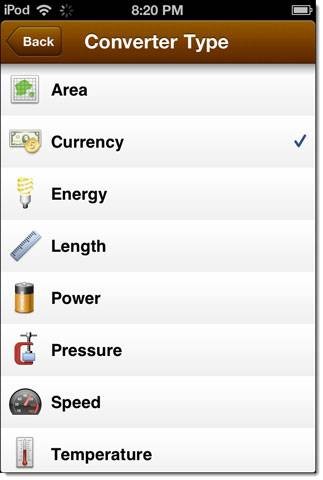
As an example, let's examine volume conversions, specifically from gallons to liters. The method for selecting different unit categories remains consistent and straightforward.
For those interested in common bar measurements, the app includes the U.S. pint, although an Imperial pint option is currently absent.
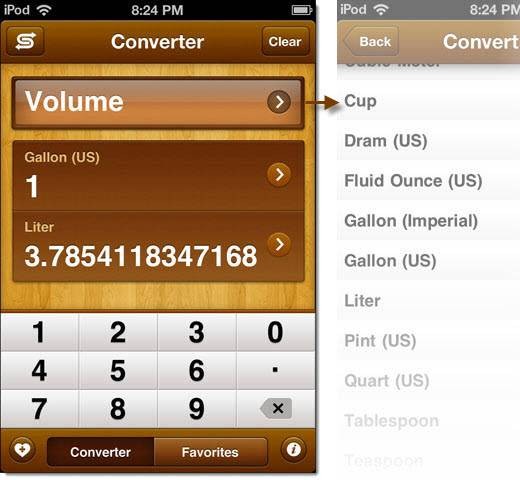
Ultimately, frequently used measuring units and currency conversions can be saved to a Favorites list. This feature provides rapid access to preferred measures, eliminating the need for repeated configuration.
![No More Socks - Holiday Gift App [iOS]](https://static.grandtechnologies.net/no-more-socks-makes-your-holiday-shopping-easy-ios-free-for-a-limited-time.jpg)



![Convertible - Measurement Conversion App [iOS]](https://static.grandtechnologies.net/convertible-converts-any-measurement-with-a-slick-user-interface-ios-free-for-a-limited-time.jpg)