WWDC 2025: All Announcements - Liquid Glass, Apple Intelligence & More
WWDC 2025: Key Announcements and Developer Focus
The Worldwide Developers Conference (WWDC) 2025 commenced on Monday. As has become customary, the technology giant centered its presentations on software enhancements and emerging technologies.
Notably, the next iteration of its mobile operating system, iOS 26, was a central topic of discussion.
Addressing Developer Concerns and AI Advancement
This year’s conference arrived with heightened expectations. The company faced significant pressure to deliver on previously stated commitments.
A key objective was to address concerns raised by developers and demonstrate progress in the field of Artificial Intelligence (AI).
Navigating Legal Challenges
The company is also currently contending with ongoing legal scrutiny regarding the operation of its App Store. This context added further weight to the need for positive announcements and developer reassurance.
Successfully navigating these challenges and fostering a strong developer ecosystem are crucial for future growth.
The focus on software updates and new technologies signals a commitment to innovation and maintaining its position in the competitive tech landscape.
iOS 26: A Decade's Most Significant Visual Transformation
A substantial redesign of iOS was unveiled by Apple in 2013 with the release of iOS 7. This update proved disruptive for numerous users, transitioning from the previously prevalent skeuomorphic design—characterized by gradients and lifelike textures—to a flatter, more vibrant aesthetic embodying the minimalist preferences of Jony Ive, Apple’s design officer at the time.
Introducing Liquid Glass
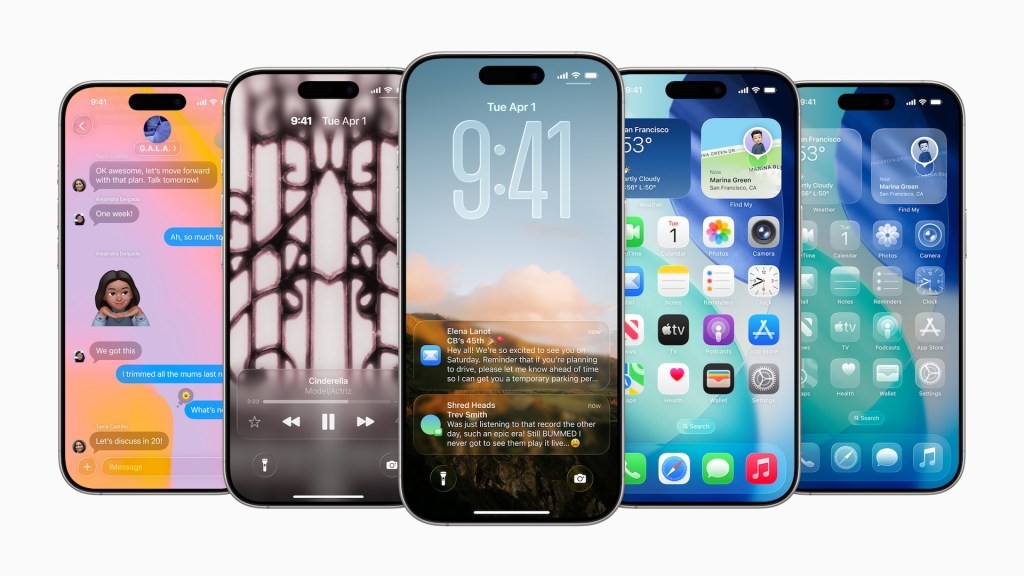
During WWDC 2025, Apple revealed a revitalized user interface dubbed Liquid Glass. This new interface incorporates lustrous, reflective, and transparent visual components, resulting in a software experience that feels distinctly “glassy.”
The Liquid Glass display exhibits translucence and mimics the behavior of actual glass. The screen’s coloration dynamically adjusts based on the displayed content, adapting seamlessly to both bright and dim surroundings.
Enhanced Interactivity and Visuals
Notifications now originate from the precise point of user interaction. Context menus expand into easily navigable lists as the user scrolls and selects options.
Updates are also being implemented for both the Lock Screen and the Home Screen, ensuring consistency with the overarching Liquid Glass aesthetic.
Key features of the new interface include a focus on dynamic color adaptation and a more intuitive interaction model.
This represents a significant departure from previous iOS designs, prioritizing a fluid and immersive user experience.
A Shift in Naming Conventions: iOS 26 and Beyond
Apple is implementing a revised naming strategy for its operating systems. Departing from the sequential numbering previously employed – such as iOS 19 and macOS 19 – the company will now incorporate the year into the OS titles.
Unified Operating System Versions
This change signifies that all of Apple’s primary operating systems will share the same version number. Consequently, the next generation of these platforms will be designated as iOS 26.
The updated naming scheme extends across the entire Apple ecosystem. This includes iPadOS 26, macOS 26, tvOS 26, watchOS 26, and visionOS 26.
Implications of the New System
- A more streamlined approach to versioning is now in place.
- Consumers will find it easier to identify the generation of operating systems.
- The new system provides a clear indication of the release year.
By adopting this unified approach, Apple aims to simplify the identification and understanding of its software versions for both developers and end-users. The transition to year-based naming will be evident with the release of iOS 26 and its counterparts.
A Specialized Application for Gaming
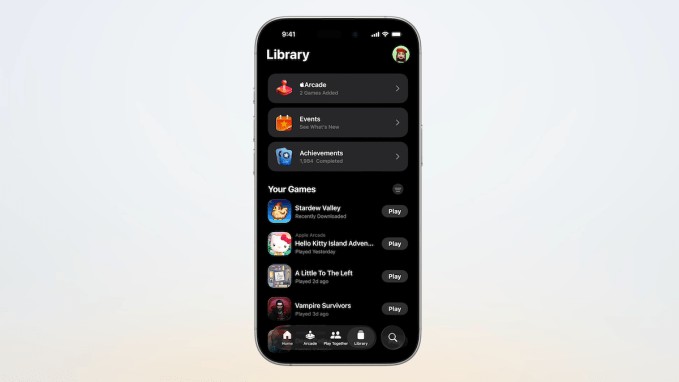
During its recent presentation, Apple introduced a new, dedicated application focused entirely on gaming. This app is engineered to consolidate the gaming experience across all Apple devices.
Functioning as a central game launcher, the application will also empower users to monitor their gaming accomplishments and access leaderboard rankings.
Enhanced Social Interaction
The Games app incorporates several social functionalities. A prominent feature is the “Play Together” section, enabling users to observe their friends’ current gaming activities, contrast scores, and extend invitations for collaborative gameplay.
Furthermore, “Challenges” presents a novel platform for competitive engagement with friends, centered around score-based contests.
 Updates Across Apple’s Operating Systems
During its presentation, Apple unveiled watchOS 26, representing a significant software update for the Apple Watch. This forthcoming release will introduce a revamped user interface, built upon Apple’s innovative Liquid Glass operating system.
A new wrist-flick gesture is also being implemented, enhancing user interaction. Furthermore, watchOS 26 will feature Workout Buddy, a novel fitness capability powered by Apple Intelligence.
Apple TV Redesign
The Apple TV experience is also set for a transformation, adopting the Liquid Glass design language for a streamlined and “unobtrusive” visual presentation, according to Apple.
A key enhancement is the expedited access to user profiles. Upon waking from sleep mode, Apple TV will now display profile selections, allowing family members to swiftly choose their profile and resume their preferred content.
Additionally, a new karaoke feature is being added to Apple TV.
macOS Tahoe Updates
macOS 26, internally codenamed Tahoe, is receiving several improvements. These include the adoption of the new Liquid Glass aesthetic, alongside an AI-powered version of the Shortcuts application.
iPadOS Enhancements
iPadOS is evolving to provide a more Mac-like experience. A new Preview feature is being introduced, offering users a comprehensive suite of tools.
These tools encompass markup capabilities utilizing the Apple Pencil, as well as AutoFill functionality. Users will also gain the ability to export images in various file formats.
visionOS and Vision Pro Accessories
Updates are also planned for visionOS, Apple’s operating system for the Vision Pro AR/VR headset.
The Vision Pro is gaining compatibility with new accessories, specifically the Logitech Muse stylus and the PlayStation VR2 Sense controller.
Enhancements for CarPlay and AirPods Announced
Contrary to earlier reports hinting at expanded gesture controls and further features, Apple has revealed that the AirPods range will be receiving two significant updates: the capability for studio-grade audio recording and a dedicated camera remote function.
The inclusion of a camera remote is also a notable addition.
Key CarPlay Improvements
Among the most substantial changes coming to CarPlay are the introduction of widgets and live activities. These additions will provide users with at-a-glance information and real-time updates directly within their vehicle’s interface.
Furthermore, users will gain the option to select a “tapback” reaction for incoming messages, mirroring functionality found in iMessage.
A new feature allows users to pin their preferred conversations, ensuring easy access to important exchanges, similar to the pinning feature available in iMessage.
Expanded Functionality
- Widgets: Provide quick access to information.
- Live Activities: Offer real-time updates on the CarPlay display.
- Tapback Reactions: Enable quick responses to messages.
- Pinned Conversations: Allow users to prioritize important message threads.
These updates aim to enhance the user experience within CarPlay, making it more informative and convenient.
Updates to Apple Wallet, Maps, and Additional Features
Alongside major announcements, several enhancements were revealed for existing Apple services.
These include travel-focused functionalities within Apple Wallet, interactive polls in iMessages, and improvements to Maps.
Apple Wallet Travel Features
New capabilities are being added to Apple Wallet to streamline travel experiences.
These features are designed to make managing boarding passes, tickets, and other travel documents more convenient.
Interactive Polls in iMessages
Users will soon be able to create and participate in polls directly within the iMessages application.
This allows for quick and easy decision-making and feedback gathering with contacts.
Enhanced Maps Functionality
Apple Maps is gaining the ability to learn and adapt to a user’s regular commute.
This intelligent feature will provide more relevant and timely information based on typical travel patterns.
Additional Improvements
Further enhancements include features for lyrics translation and pronunciation.
These additions aim to provide a more comprehensive and engaging music listening experience.
This article was initially published on June 5th and has been substantially revised to incorporate all announcements from WWDC 2025 on June 9th.
Related Posts

Apple Now a Debt Collector? New Developer Agreement Details

Instacart to Pay $60M to Settle FTC Deceptive Practices Claims
Apple App Store Japan: Now Open to Competition

Alexa+ Adds AI to Ring Doorbells - Amazon's New Feature
YouTube Disputes Billboard Music Charts Data Usage